New Structure
- Previous vs. New Structure
- Full FOAPAL Hierarchy
- Index Code Look-Up
- Grants Crosswalk
- Account Code Look-Up
- Program Code Look-Up
- Location Codes
The structure of our Chart of Accounts is based on the six part string called a FOAPAL (foe-pul). Each letter of the acronym represents a financial piece of information about the transaction. The video below explains the FOAPAL in greater detail.
Previous Structure
| F | O | A | P | A | L |
|---|---|---|---|---|---|
| Fund | Organization | Account | Program | Activity | Location |
| 6-digit numeric value | 6-digit alpha-numeric value | 6-digit numeric value | 2-digit numeric value | Multi-digit alpha value | Not utilized |
| Ex: 111000 | Ex: WB1000 | Ex: 612010 | Ex: 40 | Ex: LIBL | Not utilized |
New Structure
| F | O | A | P | A | L |
|---|---|---|---|---|---|
| Fund | Organization | Account | Program | Activity | Location |
| 6-digit numeric value | 5-digit numeric value | 6-digit numeric value | 3 to 6-digit numeric value | Will not be utilized | 3-digit numeric value |
| Ex: 112000 | Ex: 12300 | Ex: 702105 | Ex: 120105 | Will not be utilized | Ex: 200 |
The most extensive change for a normal user will be the updated coding structure. Users will receive an index code that will automatically fill in the new FOAPAL string without having to remember all of the new elements. For most departments, the index code will be their old organization code. It is HIGHLY RECOMMENDED that you learn and use your new codes. If you are using the index code, please verify that all elements are correct before submitting.
Full FOAPAL Hierarchy
INDEX CODE
View the index code crosswalk.
**IMPORTANT** The index code will only work with General Funds (101010). If you are utilizing grant funds, please use the crosswalk in the Grant section to find your new FOAPAL.
To find your index code:
- Open the PDF document above.
- Click the CTRL and F (or ⌘COMMAND and F on Mac) keys at the same time to open the search bar (it may look different depending on your browser).
- Type in your old org code (or name of your department if you can't remember you old org code) and hit the enter key.
- Verify that the code or name you searched for is what is highlighted.
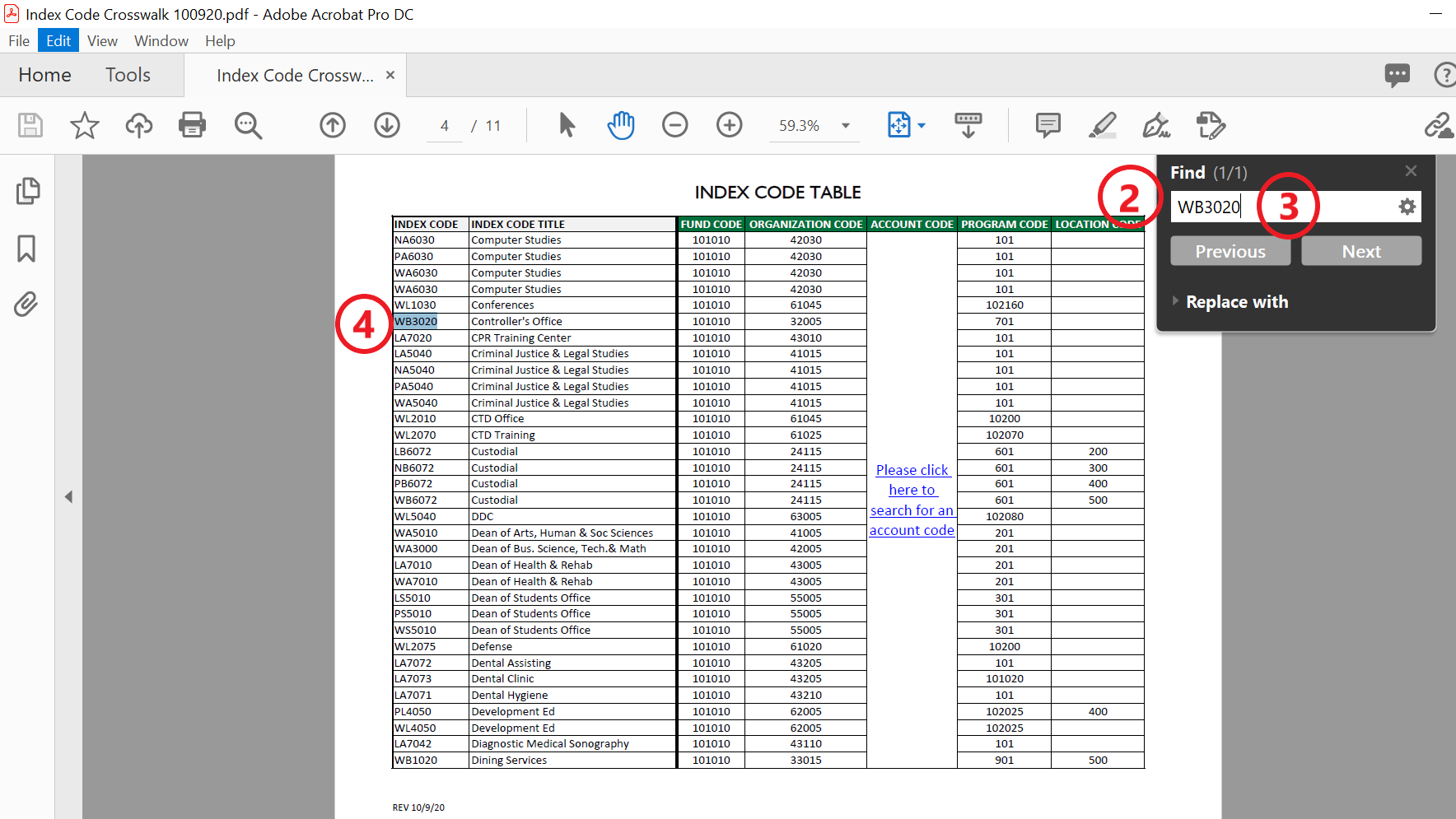
Please save your new FOAPAL string for your records.
If you do not see your old org or department name in the index code list, please contact [email protected] so we can assist you further.
GRANTS
Please use this crosswalk to find your grant's new FOAPAL string.
ACCOUNT CODE
If you knew the previous account code:
You can search the crosswalk listing here.
You can use the CTRL and F (or ⌘COMMAND and F on Mac) function to locate the code quickly.
If you are unsure of what account code to use:
View searchable account listing here.
To find the appropriate account code for your transaction, open the document. The first tab has collapsable groups that will guide you to the correct code. If you would rather search or filter from a master list, then you would select second tab titled "Master List."
PROGRAM CODE
Although a program code is defaulted to each org, it is important that you verify that the transaction matches the program code pulled in.
ex: Your org may default to Student Services Operations, but the transaction is for the training of faculty members- the code would then be Academic Support Operations.
View searchable program listing here.
LOCATION CODE
Location codes are used on transactions that are specific to the operation of the campus itself, such as utilities, maintenance, and repairs. The table below lists the codes for each campus.
| Campus Name | Campus Code |
|---|---|
| Lincoln | 200 |
| Newport | 300 |
| Providence | 400 |
| Warwick | 500 |
| Quonset | 600 |
Contact Information
Offices
Knight Campus
Tel: 401-825-2150
Fax:401-825-2032
Rooms: 2304-2322
David J. Rawlinson
Controller
Paul Rylande
Assistant Controller