Managing Your Grant within Banner
Managing your Grant within Banner
The two main Banner forms used by Projector Directors to find grant information:
- FRIGITD – Grant Inception to Date – To review all accounting related information
- FRIGTRD – Grant Detail Transaction Activity – To review line by line, all accounting related information
Note: in the examples below, Go is used to populate the forms. You can also click Next Block (at the bottom of the page ) or Alt + PgDn on your keyboard.
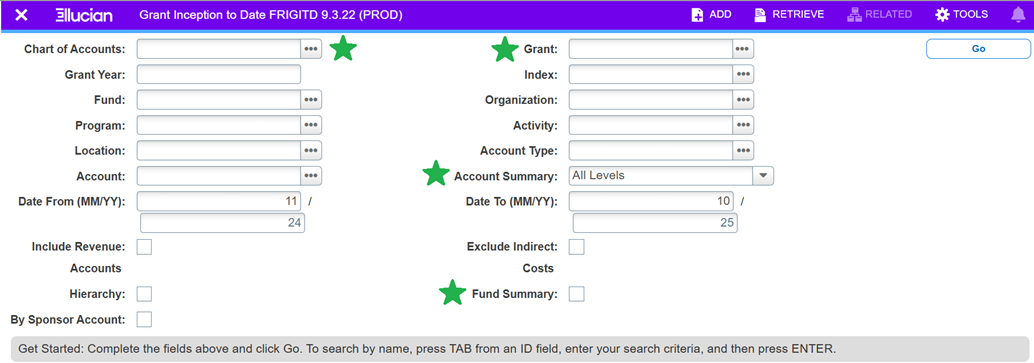
FRIGITD – Grant Inception to Date
Use this form to review all accounting details for a grant, including budget, expenditures, encumbrances, and available balances.
Steps to Access FRIGITD:
- Chart of Accounts: Enter:
- "C" for College grants
- "F" for Foundation grants
- Grant Code:
- College: G00000XXX
- Foundation: FG00000XXX
- Account Summary Level: Choose one of the following:
- All Levels – shows every account budgeted for the grant
- Level 1 – summarizes by personnel and expense categories
- Level 2 – shows major budget line items
- Fund Summary: Select if the grant includes multiple fund numbers.
- Click Go (or use Next Block or Alt + PgDn on your keyboard).
Note: you can use the arrows at the bottom of the fund section or account codes section
to see more funds/account codes if needed.
Understanding the Account Details:
- Account: Code for the type of expense.
- Type: Labor (L), Expense (E), or Revenue (R).
- Description: Description of the account code.
- Adjusted Budget: Budgeted amount for the account.
- Activity: Posted expenditures.
- Commitments: Encumbrances (e.g., pending invoices, subcontracts).
- Available Balance: Budget minus activity and commitments.
Note: Fund balances are not updated in real time. Payroll updates occur after each pay period, and indirect costs are not encumbered. Approval processes for journal vouchers, purchase orders, and invoices also affect timing.
Account Summary Levels
Selecting “Level 1 Acct Types”in the Account Summary drop down to see a breakdown of expenses by personnel and expense categories
Selecting “Level 2 Acct Types” will display the major budget line items:
Selecting “All Levels” will display every account budgeted for the grant for further detail:
Viewing by Date Range:
The default range is from the grant start date to the current month.
To view a specific period (e.g., fiscal year-end), update the Date From and Date To fields.
Note: This is useful to review costs that have posted up until the end of a fiscal/calendar year or after the grant has ended for unallowable
FRIGTRD – Grant Detail Transaction Activity
Use this form to view detailed line-by-line transactions for a specific account within a grant.
Accessing FRIGTRD from FRIGITD:
- In FRIGITD, place your cursor on the account you want to explore.
- Click RELATED (top right).
- Select Grant Detail Information [FRIGTRD].
This will display all transactions (budgets, expenses, encumbrances) for the selected account.
Accessing FRIGTRD Directly:
- Chart of Accounts: "C" for College or "F" for Foundation.
- Grant Code: G00000XXX or FG00000XXX.
- Click Go.
Filtering Transactions:
Use the Field filter and enter "YTD" to exclude budget setup, reversals, and processed encumbrances.
Exporting Data:
Click TOOLS (top right) and select Export, or press Shift + F1 to download the data into Excel for further review.