Tables
Summary
HTML tables are appropriate for presenting data in two dimensions. In these kinds of tables, there are clear relationships between rows and columns, and typically present row headers, column headers, or both. Screen readers afford users special functionality within tables, such as querying the row and column headers associated with any particular cell.
Use Headers and Scope
Data tables should always include table headers. Header rows and columns should always
include a <thead> tag, residing outside the main body of the table. Table cells should include a <th> element. The <th> element(s) should always have a "scope" attribute. Column headers should include scope="col", and row headers should include scope="row". Including scope attributes allows assistive technology to better understand the
logical relationships presented in the table.
Footers are optional and typically include the <tfoot> tag, which resides outside the main body of the table. This option can be accessed
by selecting row > row properties to edit row type.
Please Note: If you need help accessing the code editor to write a short description label for the table "summary" attribute in the table tag, please reach out and let us know; currently, there is no selection option for this accessibility requirement related to the table tool.
How to create a table
- 'Click' on your snippet tool (puzzle piece)
- Choose "Table Responsive"
- 'Right-click' inside table header, select row > row properties to edit row type
- Highlight text inside table header, select cell > cell properties to edit "cell type" and "scope"
- 'Right-click' inside cell and select row or column to add or delete
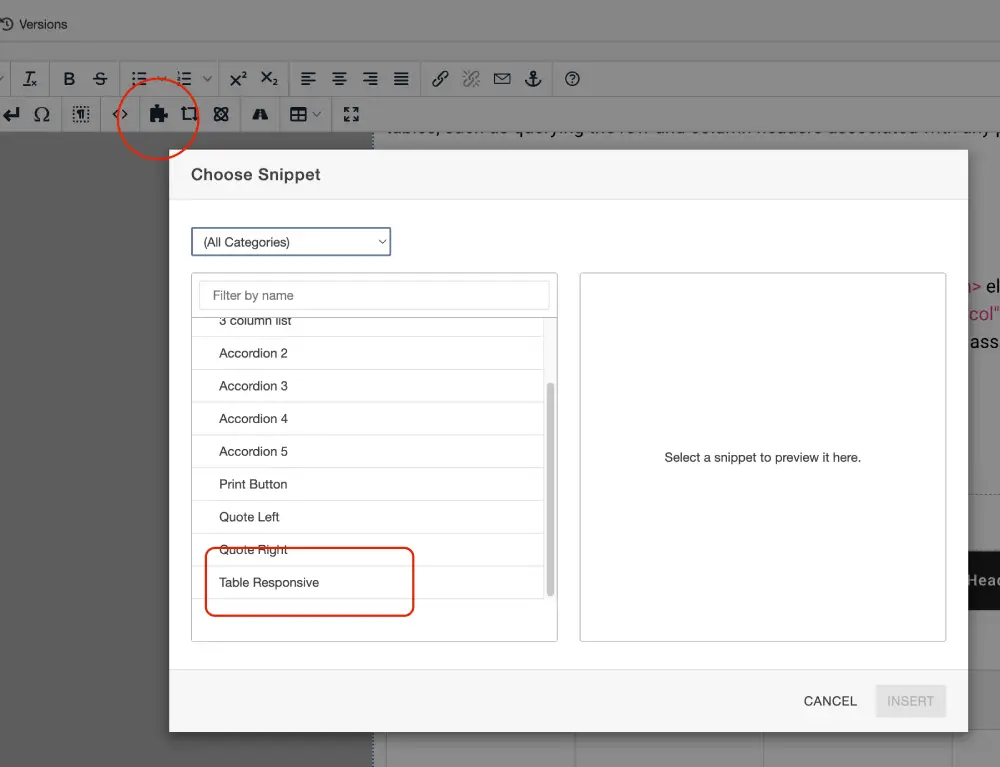
Table Example
| Table Header | Heading 2 | Heading 3 | Heading 4 |
|---|---|---|---|
| Table Cell | |||
Use Table Captions
Tables can be given an accessible name with the <caption> element. Screen readers allow users to view a list of tables on the page. If the
table has an accessible name, a screen reader will provide that name to the user.
If not, the screen reader may only read the number of rows and columns. Thus, a <caption> provides substantial usability benefits, especially if there are more than one table
on the page. <caption> elements are visible to sighted users as well, unless CSS is written to hide them.
Avoid Complex Tables
CCRI recommends avoiding tables with multiple levels of row or column headers and headers that span multiple rows or columns on CCRI websites. Such tables may be difficult to implement with the correct markup and scope attributes, and even if implemented correctly, may be difficult for users to understand. In most cases, some other presentation of the data, including presenting multiple tables, may be an equally effective alternative to a single, complex table.
Have A Question?
Contact Computer Science and CybersecurityAt the Community College of Rhode Island, our Computer Science and Cybersecurity programs are designed to equip students with essential skills for the digital age.