Community College of Rhode Island

Register now for summer courses

Related Links

For Students: How to login to a password protected site

How to login to a password-protected site

For Faculty and Staff

IMPORTANT: Please read these instructions before attempting to login

Full-time CCRI faculty and staff can access password-protected areas of the CCRI public site (www.ccri.edu) by logging in using their domain account user name and password.

How do I know if I have a domain account? All CCRI employees have domain accounts.

I have more than one username and password so, which one do I use? If you login to a college computer, either in an office or in a classroom, to access your department's share drive, you are using your domain account user name and password to login. This is the user name and password you need to use to access password-protected areas.

If you have never used your domain account to login to a college computer, try using your MyCCRI user name and password (more on this below).

Instructions and Screenshots
Step 1

Print-out these directions -- [Click to Print This Page]

Step 2

Click on the link to the password protected site. (This link may have been sent to you in an e-mail or it may be a designated link on a publicly accessible area of the site.)

NOTE: Clicking on the link to the password-protected site will cause a pop-up "Connect to www.ccri.edu" login window to appear (see screen shot below).

Step 3
  1. When the "Connect to www.ccri.edu" login window pops-up*, enter the following:
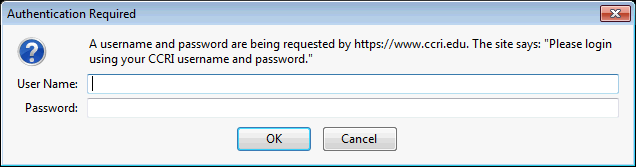
    1. In the "User name:" field, type: campus\(your user name)
      1. When we say "type: campus" we literally mean, type the word "campus"...  you should not type YOUR particular campus, such as "Knight Campus"
      2. IMPORTANT! you must use the "backslash" character after the word "campus". The backslash character is located above the "Enter" key on your keyboard.
      3. Type in YOUR username after "campus\" ...this is usually the same name that appears before the "@ccri.edu" in your e-mail address. For example, Professor Jane Doe's CCRI e-mail address is:jdoe1@ccri.edu. Jane's username would be "jdoe1" so she would enter "campus\jdoe1" in the user name field.
    2. In the "Password:" field, type the password you use to login to your CCRI office computer or CCRI classroom computer --the one that allows you access to your department share drive on the server. This is your "domain account password"
      1. PLEASE NOTE: Your domain account password may or may not be the password you use to login to MyCCRI.
    3. Click the "OK" button
    4. Important: If you are not successful after trying the above ONE TIME stop, and see "Troubleshooting" section below.

*NOTE: The screen shot above is the one you will see if you are using Internet Explorer browser on a Windows XP machine. This login window will look a little different in other browsers and/or operating systems, such as Firefox or Windows 7.

Troubleshooting
  1. If you can't login after following the above directions:
    1. Stop after one unsuccessful try --Trying to login more than 3 times using an incorrect login procedure will "lock" you out of your account. The system does this as a safeguard against unauthorized access attempts.
    2. Before trying to login again:
      1. Re-read the directions...one wrong step will prevent you from logging in.
      2. The most common error is using the forward-slash character instead of the backslash character after the word "campus".
      3. Another common error is using the wrong password. You must use your domain account password in this case, which may or may not be the same as your MyCCRI password.
      4. If you have forgotten you domain account password, visit or call the help desk during regular business hours at 401-825-1112. (See business hours here.)
    3. If you have tried to login 4 or more times unsuccessfully, you may be locked-out. The system does this as a safeguard against unauthorized access attempts.  
      1. If this happens during regular business hours , call the help desk: 401-825-1112, and tell them you may be locked-out of your domain account.
      2. If this happens after regular business hours or on the weekend or holidays, you may e-mail the help desk at: helpdesk@ccri.edu and follow-up with them on the next business day by phone or in-person.

Go to top of page

This page developed and maintained by Office of the Vice President for Academic Affairs. Send comments and suggestions to .


Last Updated: 6/11/12